
You have knowledge that could help people. The challenge is turning that knowledge into something they can actually use and pay for.
With FormWise, you can build an AI tool that applies your expertise without writing code. Instead of simply handing someone a document, you can give them an assistant that answers questions, creates content, or guides them through a specific process.
I built a lead magnet agent and an infographic creator to test this. Here’s how the pieces fit together, how to package them, and what to keep in mind before charging for access.
Choose the Right Type of AI Tool
FormWise supports three formats. The main difference is how much structure you want to give the user.
- Agents: Think of these as custom GPT-style teammates. They use your knowledge to handle open-ended questions and create relevant content.
- Flows: These follow a fixed sequence of steps. They’re useful when you need to collect specific inputs and apply the same process each time.
- Teams: These combine agents and flows behind a supervisor that routes requests to the appropriate tool.
You can package these tools into a suite and charge for individual tools or the collection. For my example, an agent handles general lead magnet guidance, while a connected flow handles infographic creation.
Build an Agent Around a Clear Outcome
Suppose you’re a marketer who knows how to create lead magnets. You could build an agent that helps business owners choose an approach and generate the material they need.
I started with a straightforward name: Lead Magnet Agent. Then I gave it a clear role. FormWise also lets you add a summary, define a persona, and adjust its overall tone.
There’s an optional conversational voice feature, too, but enabling it requires an ElevenLabs API key. The preview panel lets you test responses as you configure the agent.
Define Goals and Add Knowledge
I gave my agent two goals:
- Create lead magnets quickly, with a focus on conversion.
- Research the target audience before drafting.
That second goal matters. A useful lead magnet needs to speak to a particular audience, not just produce generic information.
Next, I connected a knowledge base containing two YouTube videos and an article about lead generation and lead magnets.
FormWise supports PDFs, text files, CSVs, images, websites, YouTube videos, Google Drive files, and Notion documents. You can organize knowledge into folders and pages, including standard operating procedures you want the tool to follow.
Choose Models, Capabilities, and Boundaries
You can select models from providers such as OpenAI, Google, and Anthropic, or use simplified options for smarter reasoning, balanced responses, or faster replies. The faster option is recommended in the builder and consumes fewer credits.
Additional capabilities include web search, scraping, deep research, and image generation. These built-in capabilities consume credits, so consider which ones your tool actually needs.
I also connected Canva. FormWise offers many third-party integrations and lets you choose which actions an agent can perform within a connected app.
Finally, add guardrails covering what the agent should avoid, what’s outside its scope, and what it must never do. Conversation starters make it easier for users to begin. Assign access plans, test the agent, and publish when you’re satisfied.
You can share it through a link, embed it on a website using an iframe, or use a custom domain.
Use a Flow for a Repeatable Process
My second tool was an Infographic Lead Magnet Creator. Unlike the open-ended agent, this flow collects information before generating a result.
You can present a flow as a form or a chat. I chose chat so the tool could ask questions conversationally.
The inputs cover:
- The primary target audience.
- The business or service’s main focus.
- The key message for the infographic.
- The user’s email address.
You can make fields required and validate answers by type, length, or minimum and maximum character limits. The email field uses an email question type.
Inside the Expert step, you choose the model and write the instructions. What’s useful here is that you can insert the answers directly into the prompt, so the output reflects the audience, business, and message provided.
I connected Canva to this flow as well. The builder’s assistant can help generate flows and configure agents. Quality settings let you define rules and test cases, including edge cases. You can also name the tool, generate an icon, select chat or form presentation, and assign plans before publishing.
If you’re stuck on what to build, FormWise’s free AI Tool Idea Generator can suggest ideas tailored to your expertise. That’s where my infographic creator idea came from.
And remember: an AI tool can be a lead magnet itself. You can offer access for free and collect email addresses rather than charging immediately.
Package Your Tools Into a Branded Portal
Building the tools is only part of the process. You also need somewhere customers can access them.
FormWise uses portals for that customer-facing experience. A suite organizes your agents, flows, and teams, and you connect that suite to a portal.
Configure access groups, then connect a storefront through the self-service settings so people can purchase access. You can customize the portal’s logo, name, and color theme, with previews for the login experience, emails, and pricing page.
Users sign in using an email code. Webhooks can notify third-party services about portal events, while user profiles show each person’s plan, credit consumption, and activity.
Set Up Paid Plans and Credit Limits
In my example storefront, I configured two plans:
- Free: 100 credits with access to both tools.
- Pro: $29 per month with 500 credits and access to both tools.
Those are example prices, not required pricing. You decide what each plan unlocks. You can also offer a free trial, sell credit packs, or allow subscribers to bring their own API keys.
At the time of my setup, Stripe was the only payment gateway, and FormWise took a 10% share. Check the current terms before setting your prices.
Your storefront can use a custom domain or be embedded on a website or sales funnel. After checkout, customers can go directly to the connected portal. Sales and revenue are tracked inside FormWise.
Test the Complete Customer Experience
I asked my agent to create a lead magnet for dental practice owners who wanted more patients through Google Maps. It produced a PDF guide with steps for improving a Google Business Profile, tables, and a quick-start checklist.
Then I requested an infographic. The agent used the connected flow, collected the necessary details, and generated a visual lead magnet.
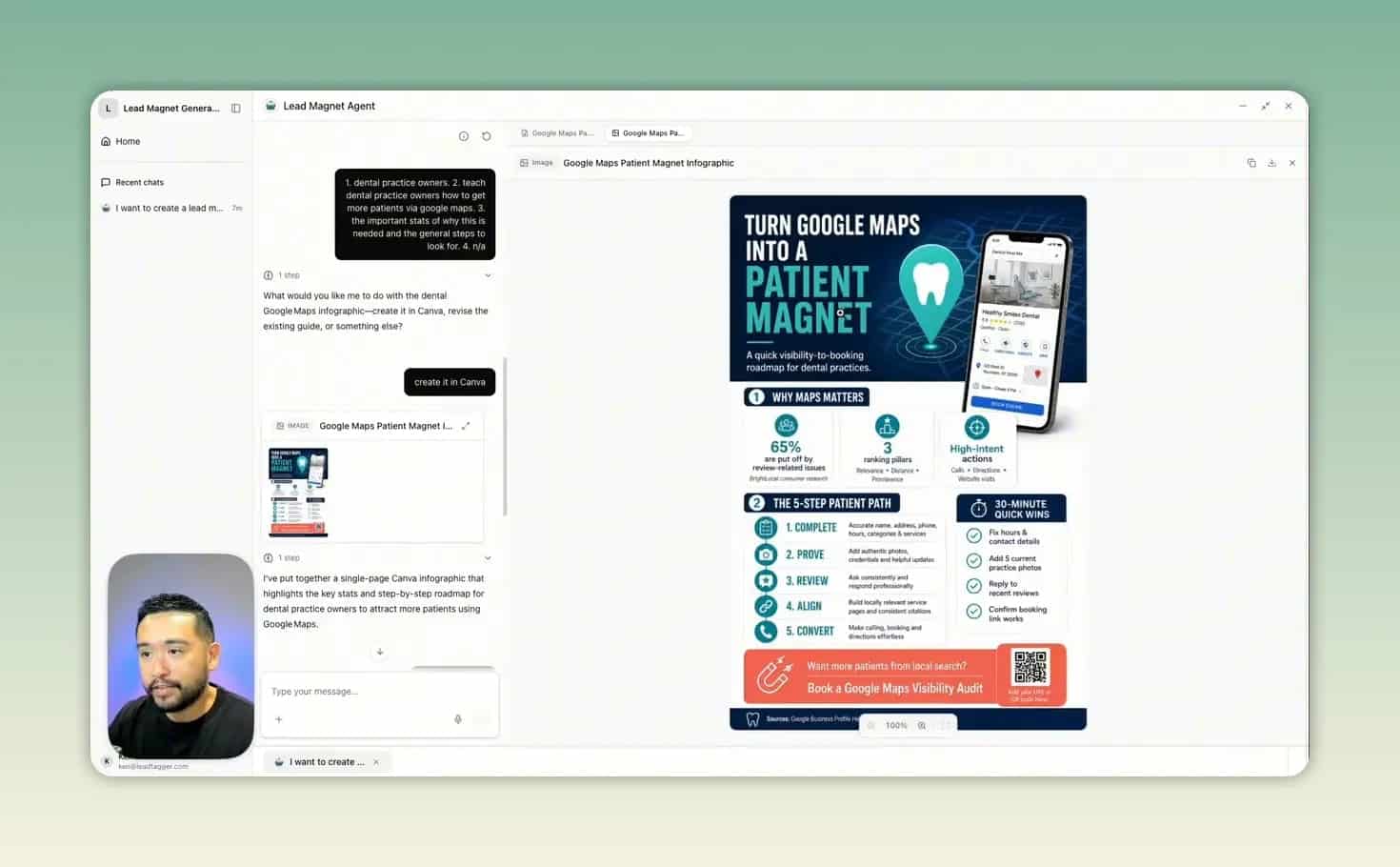
There was an important limitation: that infographic hadn’t been moved into my Canva account. When I tried to continue, my free account ran out of credits. An earlier test had successfully moved an infographic into Canva, but this attempt stopped before I could complete that step.
That’s why you should test the entire workflow, not just the initial output. It also demonstrated the upgrade mechanism: once free credits are exhausted, users need more credits or a paid plan to continue.
Start With One Useful Tool
At the time of my review, FormWise’s Creator plan started at $39 per month, and a limited-time AppSumo lifetime offer was available. Check the latest deal and pricing before purchasing. This is an affiliate link, so I may receive a small commission.
You don’t need a huge suite to begin. Start with one outcome your expertise can help someone achieve, build a focused tool, and test it. The opportunity is to make your knowledge useful on demand, then offer a clear way for customers to pay for continued access.